Overview
Field Mapping determines how data from Salesforce is translated into the corresponding AWS ACE fields when sharing opportunities through Flow.
By defining these mappings, Flow automatically prepares opportunity data for AWS submission, ensuring the required information is correctly populated and minimizing manual work during the co-sell process.
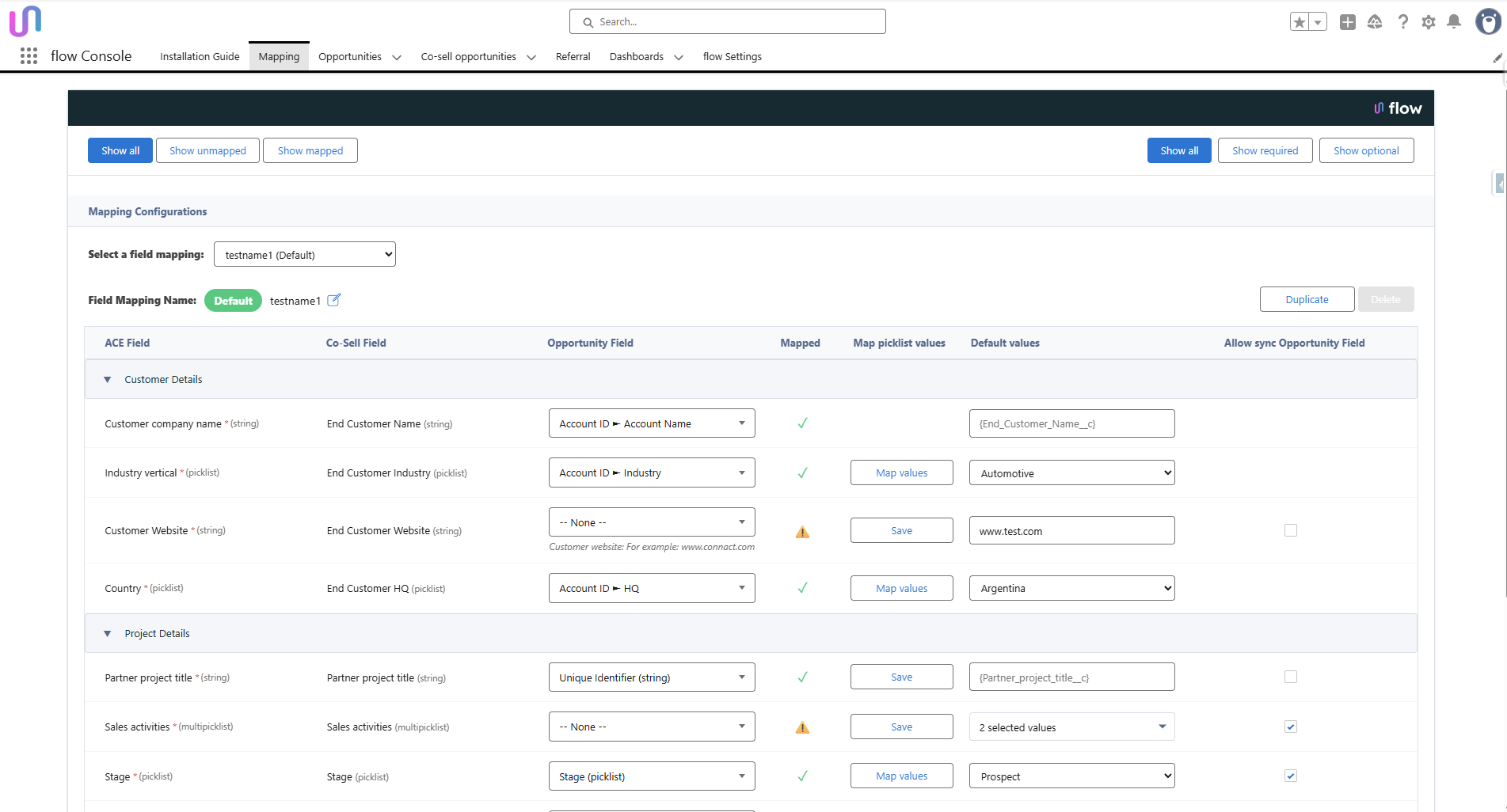
With Mapping, you can:
✔ Map CRM fields to ACE fields
✔ Map picklist values to ACE picklists
✔ Define default values
✔ Ensure required ACE fields are always populated
✔ Prevent sync errors and failed submissions
This guide explains each mapping section and how to configure the fields correctly.
TABLE OF CONTENTS
Setup & Environments
Manual sync is recommended.
- You have the option to test mapping before syncing live deals by configuring mapping in Sandbox before applying it to production.
Best practices
Field Types Must Match
String → String
- Date → Date
-
Picklist → Picklist (Picklists cannot map to text fields)
Defaults Prevent Sync Errors: If a CRM field is empty the default value will be sent instead.
We strongly recommend setting defaults for all required ACE fields.
Picklist Mapping Explained
When mapping picklists, you can:
- Auto-match identical values
- Manually match values
- Define a fallback default
Testing Checklist - Before going live
Validate all mapping rules
- Confirm picklists map correctly
- Confirm required fields are never empty
- Submit a test opportunity
- Review data as displayed in ACE
- Adjust defaults where needed
Mapping Sections & Field Guidance
The Mapping page is organized into sections. Each section is explained below.
1) Customer Details - These fields identify the end customer organization.
ACE Field |
Best Practice |
Customer data universal number system (DUNS) |
A 9-digit numeric identifier of your company. Enter the 9 digits without dashes or spaces. |
Customer Company Name |
Map to Account/Company name |
Industry Vertical |
Use picklist mapping + default |
Customer Website |
Add fallback (e.g., example.com) |
Country |
Required value |
State / Province |
Optional |
Postal Code |
Enter according to the country’s format (numeric, alphanumeric, etc.)[7]. Up to 20 characters. Required in ACE (helps AWS align the opportunity). If the postal code starts with zero, format as text so leading zero is preserved. |
City |
|
Address |
Optional text field |
2) Project Details
ACE Field |
Meaning |
Best practice |
Partner primary need from AWS |
Indicates whether AWS co-sell support is required. |
If yes - Share the opportunity with AWS to receive deal assistance and support. ensure you fill in Sales activities. If no - Share this opportunity with AWS for tracking purposes. No assistance is needed.
|
Partner specific needs from AWS for Co-sell |
Select the specific types of support you need from AWS to help close this opportunity. |
You can select multiple options to indicate all areas where AWS assistance would be valuable. |
Partner Project Title |
Deal or Opportunity name |
Partner project title can contain up to 255 characters |
Opportunity Type |
New Business / Renewal etc. |
Select the value that best describes the opportunity |
Sales activities |
Engagement progress |
Multi-select Choose sales activities completed with the customer.
|
Stage |
Deal stage in lifecycle |
This maps to the Salesforce Opportunity Stage. |
Customer business problem |
Free-text description of the customer’s pain point. |
Optional but recommended for clarity. 20-1000 characters.
|
Solutions offered |
Your product or service |
Select up to 10 services you plan to provide to the customer. If your solution isn't listed, choose Other and describe it in the next field. The values here come from the services you already registered in AWS Partner Central |
Other solution description |
|
If you selected ‘other’ in the previous field – fill the information here. |
Next step |
Describe the Agreed next action |
|
Use Case |
Solution type |
Default recommended |
3) Opportunity Marketing Details - Used to track how the deal originated.
Field |
Meaning |
Opportunity Source |
Indicate if this opportunity originated from a marketing campaign or activity. |
Marketing Campaign |
Campaign Name |
Marketing Activity use-case |
Whether AWS funding is applied |
Marketing development funds |
Did you use AWS funding? |

4) Additional Details - These are optional and may include:
Field |
Meaning |
AWS Account ID |
Customer AWS account number |
Competitive Tracking |
Competitors involved |
Additional Comments |
Free-form notes |
5) Customer Contact Details - Details of the customer stakeholder.
6) Partner Primary Contact - Identifies the main point of contact from your company.
7) SaaS / Contract Documentation (Optional)
Only configure these if they are part of your process:
Procurement type
Contract effective dates
Contract expiration date
Once you fill the Procurement type the rest of the fields are mandatory otherwise, they may remain unmapped.

Best Practices Summary
✔ Always define defaults for required ACE fields
✔ Keep field names aligned to AWS terminology
✔ Use clear customer-focused language
✔ Test mapping after CRM schema changes
✔ Review regularly with Sales Ops

Was this article helpful?
That’s Great!
Thank you for your feedback
Sorry! We couldn't be helpful
Thank you for your feedback
Feedback sent
We appreciate your effort and will try to fix the article